What is the Rave Guardian App?
Rave Guardian is a free app created by Rave Mobile Safety, which the University already uses to send Orange Alerts via platforms such as email, phone and text, provides a number of safety tools designed to keep you safe. With Rave Guardian, users can stay connected and receive important campus notifications, communicate with campus safety, and gain access to resources needed most.
For more information regarding the app itself as well as frequently asked questions, we encourage you to check out the Department of Public Safety's website page regarding the Rave Guardian App: https://dps.syr.edu/public-information/rave-guardian-safety-mobile-app/
Features of the App Include:
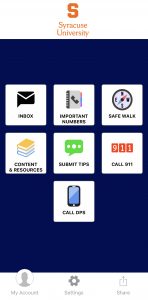
- Easy Emergency Communication: With a push of a button, you can directly connect to 9-1-1 or DPS in an emergency.
- Guardians and Safety Timers: Access an extra layer of safety when walking alone. As a registered user, you can add friends and family members as “Guardians” and send a text message when you begin an activity—say, a walk home from class or to a friend’s residence hall. You can set a timer with your current location, plus a note of where you are going and when you should arrive; you then can share that journey with your “Guardian,” who can track your progress on a GPS map in real time. In the event you do not make it to your destination and deactivate the timer, your “Guardians” will be immediately alerted.
- Anonymous Tip Reporting and Real-Time Chat: Prevent dangerous situations by submitting a tip—anonymously or associated with your profile—and have real-time chat interactions with a member of the DPS dispatch team. This way, dispatchers and police can get the information they need about suspicious behavior, unsafe situations, or crimes and you can be sure the issue is being reported without drawing attention from those around you. The app allows you to text suspicious activity to DPS, using photos or video.
- Push Notifications: Rave Guardian offers a seamless notification process in the event of an emergency. In extreme circumstances, phone lines may prevent some messages from going through quickly; Rave Guardian’s push notifications allow you to get the message almost instantaneously, even if you don’t have cellular service, such as in the basement of a building. (Wi-Fi access would be necessary.)
- Quick Access to Critical Resources: Beyond being able to contact DPS or 911 with the touch of a button, you can also access important phone numbers and websites for safety and wellness resources—on campus and beyond.
How to setup the Rave Guardian App?
Setup your Rave Guardian App in 3 Easy Steps: - Download the app from the Apple App Store or Google Play Store.
Launch the app to set up your account.
Note: The first time you launch the app, you may be asked to allow "location services" and
"send notifications." The app relies heavily on these features, so we encourage you to enable
them.
- Enter your mobile phone number and tap Continue.
- The app sends you a verification code via text. Enter the code and tap Continue.
Note that you must agree to the terms and conditions in this step. - Enter your College email address (do not use any aliases you have created), and
tap Continue. - The app sends another verification code to your College email address. Enter the
code in the app and tap Continue. - Select your campus and tap Save.
- The app will ask you to confirm your Syracuse University information. Tap yes if it is correct. Swipe
through the brief tutorial to display the main Rave Guardian screen. - You're now ready to begin using the Rave Guardian app.
|
Who can use the application?
The application is available for use by all current Syracuse University students, faculty and staff who are registered with the Orange Alert system.
Does Rave Guardian have the Safe Walk feature that LiveSafe had?
Yes, the Safe Walk feature in Rave Guardian is a safety timer. Much like LiveSafe, you can invite friends or family ("Guardians") to watch you virtually walk to your destination. Your "Guardian," will be sent a link and does not need the app to watch you walk safely to your destination.
DPS Contact Information
315-443-2224 from any phone or by dialing #78 (#SU) from your cell phone or 711 from a campus landline.
The DPS office on Main Campus is located at 005 Sims Hall